
FIDS and Standard Choices
- Velosimo Configuration
- Accela Configuration
- Solution
- Updating the Project ID
Accela Configuration
Below is all the Accela configuration: Users, FID’s, Standard Choices, EMSE scripts, and the Document > 3rd- party Integration settings that must be configured for Accela to work with ePlanSoft. The configuration below will need to be added or updated in Accela for connecting with Velosimo and ePlanSoft.
FIDs
|
FID |
User/Group |
|
0364- Restful Script APIs |
Enable the 0364- Restful Script APIs for all the user groups fo the Conenction user. Make sure this FID is turned on for this user is in the Admin groups for all the Modules in the project. |
|
8433-Document Permission Settings - 7.0.0 |
All users using ePlanSoft have this FID enabled |
|
8504-Document Checklist - 7.3.3 |
All users using ePlanSoft have this FID enabled |
|
8474-Check-in permission - 7.1.0 |
All users using ePlanSoft have this FID enabled |
|
8486-Compare Documents - 7.2.0 |
All users using ePlanSoft have this FID enabled |
|
8478-Document Assign Permission - 7.2.0 |
All users using ePlanSoft have this FID enabled |
|
8505-Document Review Comments - 7.3.3 |
All users using ePlanSoft have this FID enabled |
|
8477-Document Review Permission - 7.1. |
All users using ePlanSoft have this FID enabled |
Accela Standard Choices
Six standard choices needed updated/added to Accela.
-
EXTERNAL_DOC_REVIEW
|
Standard Choice Value |
Value Desc |
Description |
|
ACCOUNT |
username=velosimo;password=notused |
This setting is the same for every client.
|
|
PRODUCT |
EPC |
This setting is the same for every client. |
|
WEB_SERVICE_URL |
Velosimo will provide this URL for each environment |
This URL enables the Documents > 3rd- party Integration settings in the V360 admin. |
2. VELOSIMO_SETTINGS
|
Standard Choice Value |
Value Desc |
Description |
|
VELOSIMO_ACCELA_USER |
VELOSIMO |
The user used to connect to the Accela Construct API. Set the password out 9999. Add user to the Admin group. |
|
VELOSIMO_TENANT_KEY |
TBD |
Tenant-Access-Key - will be provided by Velosimo |
|
VELOSIMO_TENANT_TOKEN |
TBD |
Tenant-Access-Token - will be provided by Velosimo |
|
VELOSIMO_URL |
This URL will always be https://connect.velosimo.io unless Velosimo provides a different URL. Ensure there is no slash at the end of this URL or the 3rd-party Integration settings drop-down values will not populate. |
3. EPR_REVIEW_TASKS - Accela workflow tasks that are doing electronic plan reviews. Include all workflow tasks and only the tasks that do electronic plan review. Maps to the SubTasks tab on the Accela workflow, there is one Subtask for each review document on the workflow task.
Maps to the ACCELA_CORRECTIONS_WORKFLOW_TASKS setting in Velosimo>ePlanSoft.
4. EPR_DOCUMENT_CATEGORY - this is a list of all the document types used for electronic plan review. Do not include document categories for any document not being reviewed in ePlanSoft.
Maps to the ACCELA_ROUTE_DOC_CATEGORIES setting in Velosimo>ePlanSoft.
5. DOCUMENT STATUS - this is an Accela setting. Select the Business Configuration radio button and select Document Status from the drop-down that displays.
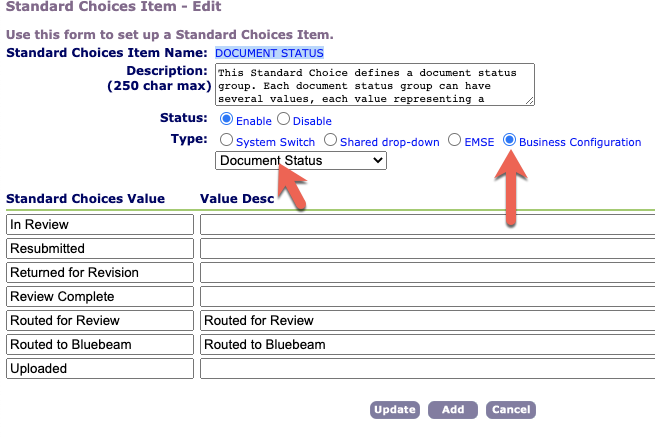
These statuses map to all the settings in Velosimo>ePlanSoft listed below.

ACCELA_ROUTE_DOC_APPROVED

ACCELA_DOC_STATUS_APPROVED_W_COMMENTS

ACCELA_DOC_STATUS_CORRECTIONS

ACCELA_DOC_STATUS_REVIEW_COMPLETE

ACCELA_DOC_STATUS_ROUTED
6. DOCUMENT REVIEW STATUS - this is an Accela setting. Select the Business Configuration radio button and select Document Review Status from the drop-down that displays.
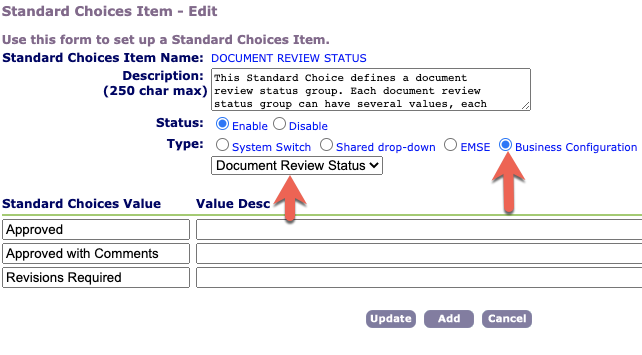
These statuses map to all the settings in Velosimo>ePlanSoft listed below.

ACCELA_SUBTASK_STATUS_APPROVED

ACCELA_SUBTASK_STATUS_CORRECTIONS

ACCELA_SUBTASK_STATUS_CANCELLED